

#064 BC DATA RETENTION POLICIES
Retention policies define how long data is stored, ensuring compliance, reducing risks, and optimizing system performance. In Business Central, they help to automate data management, aligning business and regulatory requirements.
How to activate this feature
Business Central includes a standard set of tables that can be configured to automatically delete data, based on predefined criteria. To activate this feature, access the Retention Policies list, which contains pre-existing records that you can review and enable as needed.
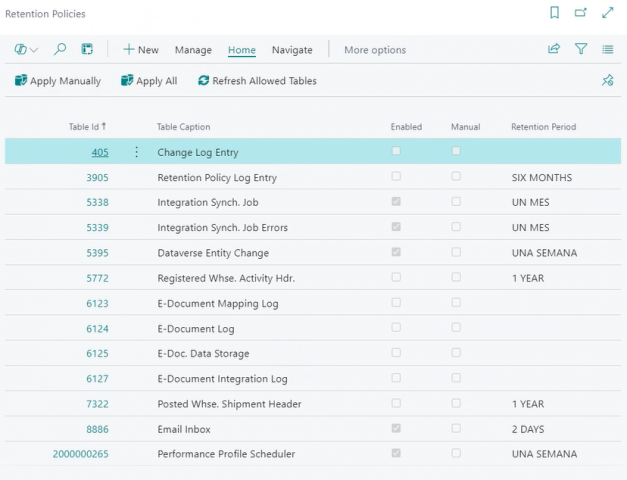
To add a new record, select the table, define the retention period, and check the enabled field. This will activate the retention police in the job queue entries.
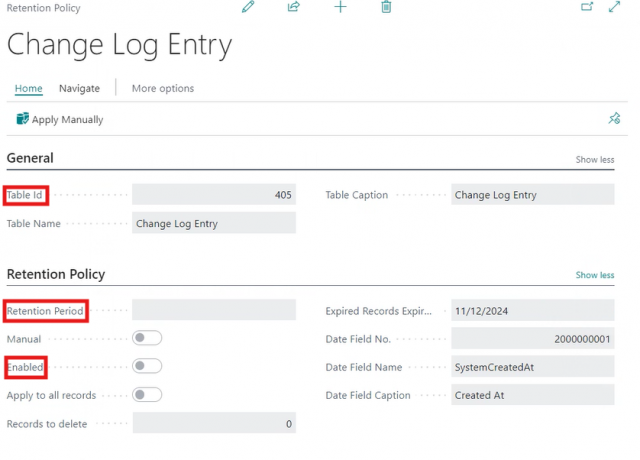
You can also apply the policy to specific data in a table, rather than all records, by filtering the data for each line. The policy will apply only to the records that the filters return.
If you only need to setup tables that Business Central standard provides, you do not need any development but in case you want to add new tables, from other apps, you need to create a codeunit (install or upgrade), so the tables can be added.
Example:
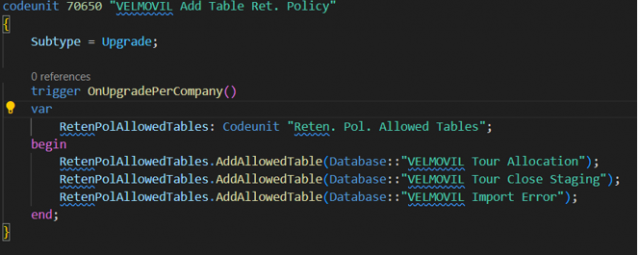
Note: The tables that can be added using the developed codeunit must belong to the same app where the codeunit is being created.
Other interesting links:
- Microsoft documentation for retention policies – https://learn.microsoft.com/en-us/dynamics365/business-central/admin-data-retention-policies